
Back to Journals » Clinical, Cosmetic and Investigational Dentistry » Volume 17
Usability Assessment of Salud Electronic Dental Record System
Authors Alshammari A  , Awawdeh M, Alsalwah NH, Alnafrani S, Alsaeed S
Received 26 July 2024
Accepted for publication 1 February 2025
Published 12 February 2025 Volume 2025:17 Pages 111—120
DOI https://doi.org/10.2147/CCIDE.S481003
Checked for plagiarism Yes
Review by Single anonymous peer review
Peer reviewer comments 2
Editor who approved publication: Professor Christopher E. Okunseri
Abdulwahhab Alshammari,1– 3 Mohammed Awawdeh,2– 4 Nawaf Hamoud Alsalwah,5 Sana Alnafrani,2,6,7 Suliman Alsaeed2– 4
1College of Public Health and Health Informatics, King Saud Bin Abdulaziz University for Health Sciences, Riyadh, Saudi Arabia; 2King Abdullah International Medical Research Center, Riyadh, Saudi Arabia; 3Ministry of National Guard Health Affairs, Riyadh, Saudi Arabia; 4Preventive Dental Sciences Department, College of Dentistry, King Saud Bin Abdulaziz University for Health Sciences, Riyadh, Saudi Arabia; 5Business Department, ArabiaTek, Riyadh, Saudi Arabia; 6Pediatric Department, Ministry of National Guard Health Affairs, Riyadh, Saudi Arabia; 7King Saud Bin Abdulaziz University for Health Sciences, Riyadh, Saudi Arabia
Correspondence: Abdulwahhab Alshammari, Email [email protected]
Introduction: As the demand for comprehensive patient records grows, dental practices increasingly adopt Electronic Dental Records (EDRs). This study evaluates the usability of the Salud EDR application implemented at the College of Dentistry, King Saud bin Abdulaziz University for Health Sciences, Riyadh, Saudi Arabia, focusing on potential users without prior experience using the application to identify usability challenges and areas for improvement. Theoretical frameworks such as the Technology Acceptance Model (TAM) and Diffusion of Innovation (DOI) were employed to contextualize the findings.
Methods: A cross-sectional study design was employed, integrating both qualitative and quantitative methods. Think-Aloud sessions captured participants’ cognitive processes during task completion, while semi-structured Exit Interviews provided insights into their overall experience and feedback. The System Usability Scale (SUS) questionnaire measured satisfaction, and navigation pathways were analyzed to compare task performance between potential users and an experienced user.
Results: Potential users required significantly more clicks to complete tasks than experienced users, indicating navigation challenges. The SUS questionnaire yielded a mean score of 31.1, categorized as “not acceptable”, reflecting low Perceived Usefulness and Ease of Use as outlined by TAM. DOI attributes such as high Complexity and low Compatibility were also evident in user feedback. Exit Interviews revealed that participants found the interface complex, with design issues such as unclear icons and terminology further complicating navigation.
Discussion: The findings underscore the need for interface design improvements, including clearer icons, terminology, and navigation pathways, to enhance usability and satisfaction. The application of TAM and DOI frameworks provided a structured lens to interpret usability challenges and inform targeted recommendations. This study demonstrates the importance of usability testing in identifying and addressing challenges in EDR systems, contributing to better user experiences and more effective adoption.
Keywords: usability, experiences, satisfaction, Think-Aloud, System Usability Scale (SUS)
Introduction
Electronic Health Records (EHRs) are vital to patients’ overall healthcare. As the drive for comprehensive patient health, Electronic Patient Records gain momentum in the medical field, and more dental practices are integrating Electronic Dental Records (EDR) into their operations.1 Electronic Health Record (EHR) often refers to systems that collect, manage, and share patient health information. An EDR is a type of record that consists of various components which can be easily accessed and stored. Its primary function is to record all of the relevant information related to a patient, patient identification data, medical history, and treatment plan.2
Before a patient visit, the dental practice’s staff members could use an EDR to manage various tasks related to the patient’s visit. They could also query insurance status, register patients, and manage other office activities.3
The use of Electronic Patient Records (EPRs) is becoming increasingly important in the healthcare sector, as it provides comprehensive patient health information. Electronic Dental Records (EDRs) are a type of EPR specifically designed for dental practices. Their primary purpose is to store and access relevant patient data, such as patient identification data, medical history, and treatment plans.1 Before a patient visit, dental staff can use an EDR to manage various tasks related to the visit, such as querying insurance status and registering patients.2,3 Despite the long-standing presence of both medical and dental fields, there has been limited research on the adoption of information technology (IT) in dentistry compared to medicine.4–7
Despite the obstacles and limitations of EHR, data collected through EHR are still beneficial to researchers. It can help improve care quality and patient safety by enabling quality assessment which can aid the identification of areas of improvement to support a better healthcare delivery.3
The functional requirements of an EHR are different from one facility to another. In dental schools, patients’ dental clinics are often housed and operated by the school. Dental students’ productivity and clinical experiences are tracked as part of academically focused programs.7
The use of Electronic Health Records (EHRs) in dental schools has been shown to be beneficial for researchers, as the data collected can help improve care quality and patient safety. Quality assessment enabled by EHRs can aid in the identification of areas of improvement to support better healthcare delivery.3 However, the functional requirements of an EHR vary from one facility to another. For example, the College of Dentistry at KSAU-HS implemented an Electronic Dental Record (EDR) system called Salud. This system was first developed in Dublin Dental University Hospital in the 1990s and is uniquely suited to meet the needs of the dental industry.8 The use of EDRs in dental schools allows for the tracking of dental students’ productivity and clinical experiences as part of academically focused programs.7 It is a web-based platform designed to manage patient records and workflows.
The implementation of an Electronic Dental Record (EDR) system is a complex process, requiring the consideration of various factors such as patient record standards, format, and content. However, existing dental informatics standards do not provide sufficient support for the design of user-friendly interfaces for dentistry-related applications.1 To evaluate the usability and user satisfaction of an EDR system, usability tests can be employed.9 Usability testing is a critical component in ensuring the effectiveness of an EDR system,10 as it allows developers to measure users’ performance in completing tasks and identify areas that need improvement.11 Additionally, usability testing helps determine how long participants can complete a specific task and identify any factors that may affect users’ performance.
In this study, the method of usability was applied to the EDR system, Salud, to have an overview of the user’s acceptance of the application and what challenges Salud users’ may face. In addition, the study measured the satisfaction level of the potential users. This study has chosen potential users as the target population solely because new users can present non-biased data. Studies with experienced participants tend to produce biased data and inconclusive results. Usability testing studies have shown that tests with potential users are far better than conducting them with experienced users.12 This conclusion is reinforced by a study conducted by Google that revealed differences in how employees evaluate their company’s and competing products, where the employees have given their company’s product a higher rating than a competitor’s product. Google’s study indicates the importance of potential users in usability tests to avoid bias.13
Also, this study aims to answer the question of “How to improve the Salud app usability to promote optimal dental health”. This question is subdivided into further sub-questions that state “What are the usability challenges and areas of improvement?” and “What are the acceptance and satisfaction levels of the Dental Electronic Record Salud based on the usability evaluation method?”
Method
Multiple evaluation methods were applied in this study that covered qualitative and quantitative methods. The Think-Aloud method was applied to cover the qualitative approach, while the System Usability Scale (SUS) questionnaire was used to cover the quantitative approach. In addition, Exit interviews with semi-structured, open-ended questions were conducted at the end of each evaluation session for each participant to assess their overall experience as a qualitative research method. An exploratory sequential mixed-methods design was used, where qualitative findings informed quantitative analysis. The study also aligned with the STARE-HI (Standards for Reporting of Evaluation in Health Informatics) guidelines to enhance methodological rigor.
The Think-Aloud method was adopted by Nielsen.14 It is a technique that asks users to verbalize their thoughts and feelings while interacting with a system, application, or tool. It is a beneficial technique for capturing various cognitive activities of users while interacting with Salud for evaluation purposes.15
The System Usability Scale (SUS) questionnaire was used to measure the participants’ satisfaction levels. The SUS questionnaire measures effectiveness, efficiency, and satisfaction. The SUS tool has been used extensively in the evaluation of various systems. Its usefulness has been acknowledged by Bangor, Kortum, and Miller.16
The Exit interview consists of semi-structured open-ended questions conducted at the end of the evaluation session. The objective of an exit interview is to evaluate a participant’s overall experience to identify opportunities for improvement and better engagement.17
The study was conducted at the College of Dentistry at KSAU-HS in Riyadh City and approved by King Abdullah International Medical Research Center (KAIMRC) under approval #SP21R/432/10. The study subjects included volunteer dental students participating in the study. All participants signed the informed consent, and all guidelines under the Declaration of Helsinki were followed. Participant’s inclusion criteria: (1) The age of participants must be 18 years old or older, (2) 4th year Dental college students that have no experience using Salud before participating, (3) Dental college students using Salud as a part of the Dental program study plan, and (4) Participants who are willing to participate in the evaluation session and have their voice and screen interaction recorded for analysis purposes only.
In the usability evaluation study, voice recording and screen interaction would be essential outcomes for statistical purposes. The study excluded participants who were younger than 18 years old and those who had prior familiarity with the evaluated application to avoid any bias. The researchers also excluded participants unwilling to have their voice and screen interaction recorded during the evaluation session for analysis purposes only.
A smaller sample size is recommended if a targeted population is homogenous, as it will result in participants experiencing the same issues.9 According to Nielsen, usability testing with five to nine participants is efficient, see Figure 1.14
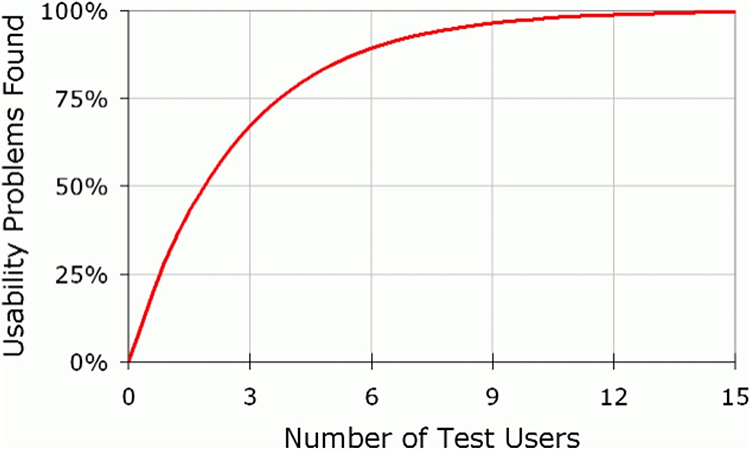 |
Figure 1 Relationship between the identified usability problems and the number of participants, adopted from Nielsen.14 |
The participants were selected using the Snowball sampling technique as a recruitment technique to reach the sample size and maintain the inclusion criteria. All participants signed a consent form before participating. The Think-Aloud method was explained to all participants verbally, and a short video explaining the Think-Aloud method was displayed to all participants (n=9) before their participation session. All the sessions were held in a computer laboratory at the College of Dentistry at KSAU-HS. The participants were assigned a workstation with a computer equipped with Salud and asked to complete seven tasks without help from the Researcher.
Each session included only three people: a participant, an observer, and an IT support technician. The observer was always present during the study sessions, while the IT support technician was not present but ready in case of any technical issues. The observer was standing at the back of the room not to disturb the participants or cause any stress. All participants were encouraged to express their thoughts verbally out loud during tasks. Whenever a participant remained silent, the observer encouraged the participant to speak out loud about their views.
After completing the required tasks and employing the Think-Aloud method, each participant was asked to fill in a (SUS) questionnaire to measure the satisfaction level of the Salud application. At the end of each participation session, each participant went through an exit interview with semi-structured open-ended questions of five questions to measure the participants’ overall experience.
To incorporate Technology Acceptance Model (TAM) and Diffusion of Innovation (DOI) into the analysis, existing qualitative data from Think-Aloud sessions and exit interviews were reviewed to identify themes related to Perceived Usefulness, Perceived Ease of Use, Relative Advantage, Compatibility, and Complexity. Quantitative data, including SUS scores, were reinterpreted to assess user perceptions through the lens of these frameworks. This secondary analysis provided a structured theoretical basis to contextualize usability challenges and recommendations.
Results
The researchers conducted three types of analysis in this study. First, the navigation pathways to complete each task are quantified by the number of clicks compared to an intern dentist who is an experienced Salud user. Second, conducting (SUS) questionnaire to measure the potential user’s satisfaction with Salud. Third, conducting a qualitative analysis of the participant’s session recordings and the exit interview responses.
Pathways Navigation Analysis
Navigation pathways are quantified by the number of clicks required to complete a task. Tasks included entering data into Salud covering a patient’s medical history, medication list, allergy, dental charting, progress, clinical notes, medication, and treatment plan. Table 1 shows the number of clicks of each participant for each task, including an expert user. The required number of clicks to complete each task was demonstrated by an intern dentist with prior experience using Salud, illustrated in Table 1 under column (E). Table 2 shows the numbers of whether tasks were completed or failed and/or participants opted out.
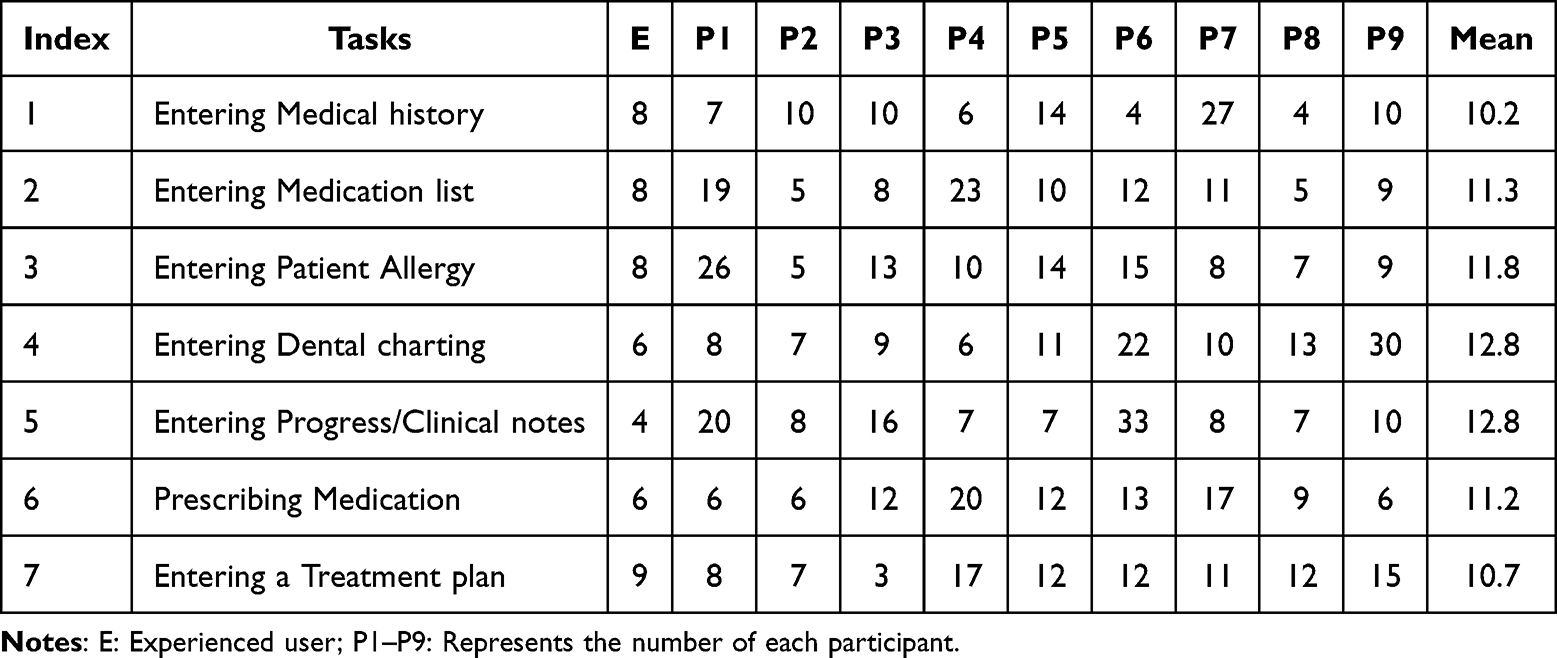 |
Table 1 The Number of Clicks for Experienced Users and Potential Users to Complete Tasks |
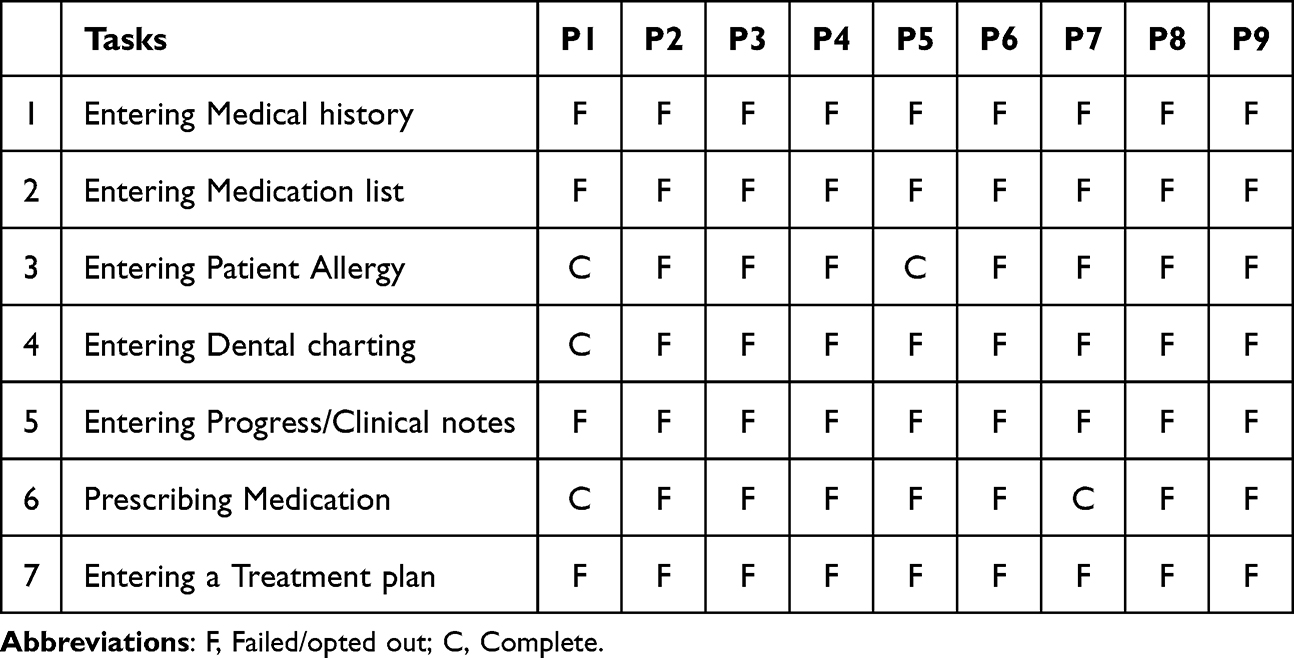 |
Table 2 Completed/Failed Tasks |
Out of the 63 tasks performed by all participants, only 5 (7.9%) have been completed. Some participants have expressed their request to skip or opt out of some tasks as they expressed that they reached a dead end; approximately (11%) of the failed tasks were tasks that were not completed or skipped.
Many failed tasks relate to participants’ inability to enter data into Salud. This is because an edit icon must be clicked before entering data, corresponding to (25.3%) of the failed tasks. Participants’ mean of clicks for each task, including skipped tasks, corresponds to a higher number of clicks than an experienced intern dentist student.
SUS Quantitative Analysis
The (SUS) questionnaire was given to all participants (n=9) who completed the Think-Aloud method, and the mean result was 31.1, see Table 3. The mean (SUS) score is converted to a grading scale (A, B, C, D, and F) in addition to an adjective rating that includes (Worst Imaginable, Poor, OK, Good, Excellent, and Best Imaginable) developed by Bangor et al, see Figure 2.16 The figure illustrates the SUS mean scores for the grading scale and adjective rating.
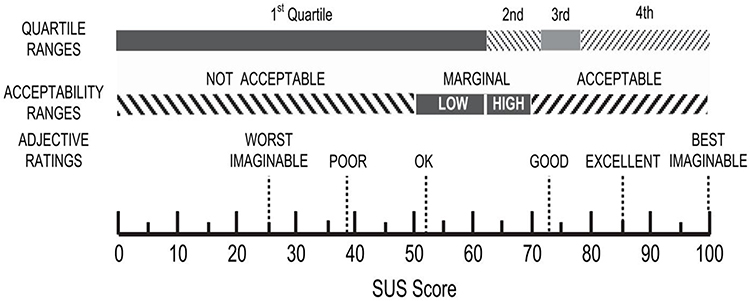 |
Figure 2 SUS score (Source: Bangor16). |
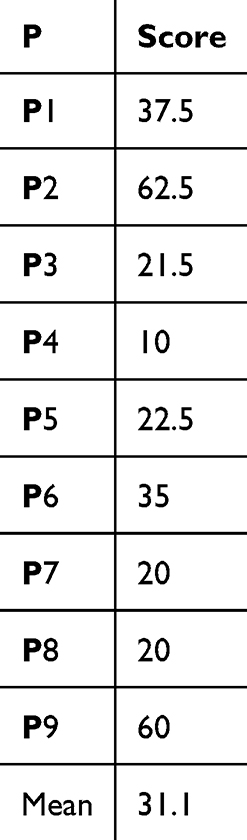 |
Table 3 (SUS) Scores for All Participants |
Figure 2 shows that a score of 70 is the minimum score for a system to be acceptable. The participants’ responses resulted in a mean (SUS) score of 31.1 with a standard deviation of 17.4. According to Bangor et al, the result of Salud’s usability from a potential user perspective can be expressed in terms of adjective ratings, such as “not acceptable”, and in terms of grading scales with an “F” Grade.16 The potential users of 4th-year students with no prior experience with Salud have expressed their satisfaction with the application’s usability with an “F” grade and “not acceptable” in terms of adjective rating.
Think-Aloud and Exit Interview Analysis
The thematic analysis process of each session was done manually, and no software was used for the analysis. In general, various opinions were recorded, and we came across multiple themes during the thematic analysis. Some of these opinions are discussed further in this section. Most of the verbalized thoughts pertain to the difficulty of the user interface and how they were not completely satisfied with the user interface.
One of the participants stated, “it looks old”. Because it has a basic design that is not colorful and attractive for a new user, another participant expressed his thoughts on the Salud user interface “it looks like windows XP, and it looks old”.
Many participants navigated through Salud with different pathways that included more clicks than the experienced user demonstrated. Only one of the five completed tasks was completed (20%) with the same pathway navigation as an experienced user.
A crucial step in opening a patient file was clicking the “Show patient yellow card” button. On the patient yellow card page, the “comp Tx plan” button was there, and this button opened a page that had everything related to the patient’s treatment plan. Many participants did not click on either button or wandered away by clicking anything randomly.
One participant utilized the “help” button while performing tasks to search for the right place to enter (dental charting). Although the help button was used, the participant expressed that it was not helping her to find the right pathway to enter dental charting. The help button offers a search bar, but when searching for (Dental charting) a guide appears that contains a long text and multiple steps to be followed to reach (Dental charting). The participant said that it was a long text, and she was unwilling to read it; see Table 4 for a list of typical challenges faced by potential users.
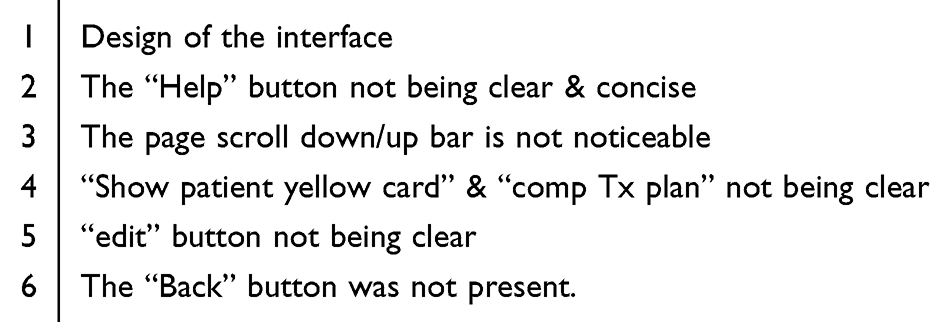 |
Table 4 List of Typical Challenges Faced by Potential Users Encountered Using Salud |
The first three tasks required to be performed by participants, which were “Entering Medical history”, “Entering Medication list”, and “Entering Patient Allergy” were on the same page. Participants only needed to scroll down the page to see the drop-down menu for the second and third tasks to complete those three tasks. Nearly all participants have not scrolled down; only two did and located where the patient’s allergy is situated. The page had a scroll bar on the right side, but the participant did not notice it.
Some participant reaches a page that has the first three tasks “Entering Medical history”, “Entering Medication list”, and “Entering Patient Allergy”. But the tasks asked were specifically to enter data into the fields of “Medical history”, “Medication list”, and “Patient Allergy”. To enter data into these fields, the participants need to click on an “Edit” icon to be able to enter data. The “Edit” icon was small, on top of the page, and it was not clear to participants as a crucial step to enter data.
A noticeable behavior occurring with all participants was that whenever they felt they made a wrong step, they closed the window and re-opened it. This is because a “Back” button was not present. A “Back” button could save users time and effort if present.
The overall thematic analysis of the Think-Aloud session resulted in two recurring themes for many participants. The first theme and most commonly encountered was hesitation. Participants kept asking if they were on the right pathway and if they had completed the task or not. The second theme encountered was worry. Participants kept asking if it was the same EDR they would use next semester when they started work in the dental clinics.
The reanalysis highlighted significant correlations between SUS scores and TAM/DOI constructs. Low SUS scores reflected poor Perceived Usefulness and Ease of Use, while qualitative feedback pointed to high Complexity and low Compatibility. The absence of Relative Advantage and limited Trialability were also evident in user comments, emphasizing the need for interface redesign and enhanced user training programs.
During the exit interviews, a question was asked about things they liked about Salud. The majority responded with their dislike, except for one participant, who said he liked the description of icons when a cursor is pointed at them; he said, “it was helpful because icons themselves were not very descriptive”. Another participant expressed that it is good to have a “help” button in case of confusion, but it was not helping as it resulted in tedious text.
On the contrary, a question asked if there are things they dislike about Salud. Three participants expressed their dislike of the design. Words such as “old” and “complex” are in most interview questions’ answers.
Last, we gave participants a chance to suggest ideas for improvements. One participant expressed, “it needs previous knowledge and a training course”, which is part of the curriculum at the college of dentistry before entering dental clinics. Another participant expressed, “it should be more friendly with first-time users”, which entails the necessity for a first-time user-friendly interface design and approachable to student expectations.
Discussion
The study was performed on the 4th year dental student with no prior experience with Salud, which could suggest a result more on the negative spectrum due to the lack of familiarity with the app. On the other hand, potential users are essential for usability test studies to have a non-bias result. Nielsen suggests performing usability testing on realistic users, not experienced users.14 College of Dentistry 4th dental students are considered realistic with their familiar background in dentistry and ability to understand the tasks. Their lack of prior experience with Salud gives non-biased usability testing results.
Performing usability testing with the Think-Aloud method has suggested that pathway navigation through the app is not exclusive to a singular pathway. Table 1 shows that an experienced user demonstrates the number of clicks required to finish a task is not the shortest pathway but the standard pathway. There are faster pathways that people with extensive experience with Salud are aware of; they were not mentioned in the study because they are not definitive and to avoid confusion.
Participants’ perceptions of the study results’ importance could differ because the study was held in a computer lab rather than a clinic, where they would feel more responsible for completing a task. Furthermore, the study could not be carried out at the dental clinics because the Think-Aloud method was the usability testing method.
One of the participants expressed his feeling regarding the user interface in comparison to other EDR systems. He said that “the EDR implemented in the National Guard Hospital Affair (NGHA) hospital, Dental department looks cooler than Salud because the EDR implemented in the NGHA hospital is more colorful and easier on the eyes”.
We observed that in the beginning, the first three steps of each task were all correct by all participants; those steps are related to selecting a patient file. A crucial step following selecting a patient file was to click on “show patient yellow card”, which led to the actual patient file. The term “yellow card” was not familiar to participants. On the other hand, some participants have navigated through the app employing multiple tedious clicks that lead them to open a patient file without clicking on “show patient yellow card”. This concludes that there are ways to navigate through Salud that are unconventional.
After reaching a patient file through an unconventional pathway longer than the standard pathway, many participants did not utilize an “edit” icon; instead, most of the participants double-clicked on data entering boxes, which did not allow them to edit.
In 2003, Payne et al proposed that more research should be conducted in the design stages to avoid generating unnecessary order sets. The findings indicated that system complexity could be reduced through fewer windows. Also, to reduce mental workload, color classification for each main menu user interface to help gain a more user-friendly interface.18
Based on the finding of Salud usability testing from the potential users’ perspective, a list of recommendations is discussed that could be used to have a user-friendly Salud interface. Table 5 shows a list of recommendations to enhance the usability of Salud.
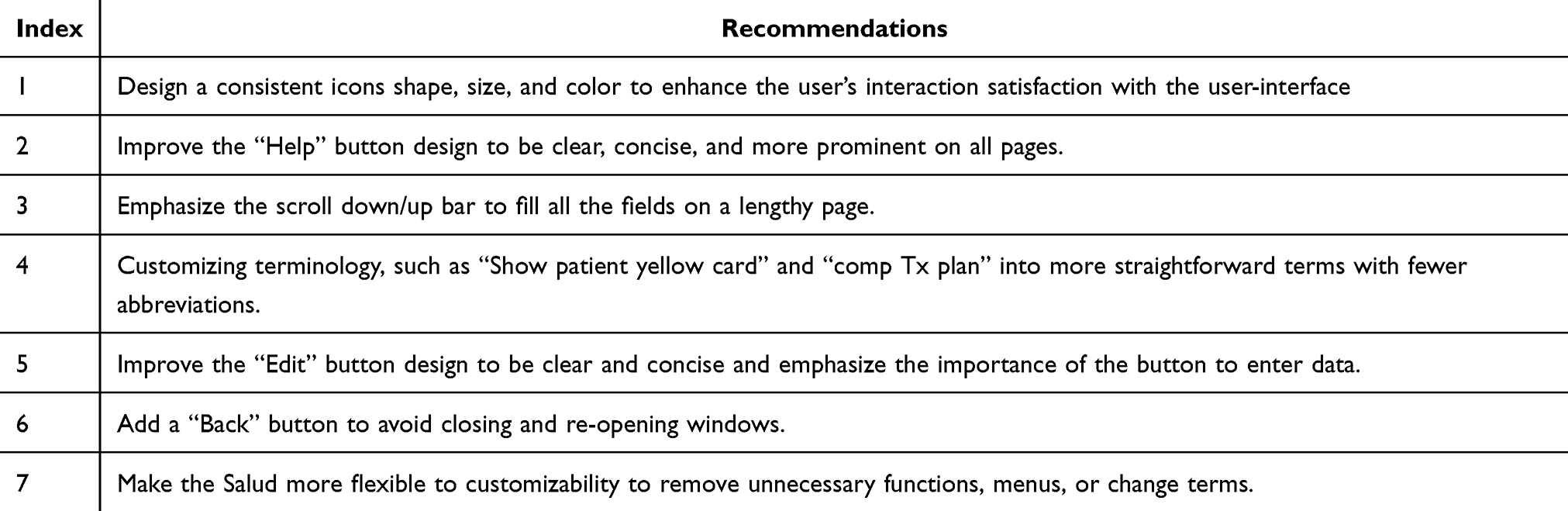 |
Table 5 List of Recommendations to Enhance the Usability of Salud |
A consistent icon design and size throughout the app could reduce the confusion of first-time users. In addition, utilizing a more colorful and attractive user interface, compared to the current design, could attract users, minimize confusion, and reduce memory load.
A bigger “Help” button icon that is consistent and present in all windows could benefit the user in case of confusion. Furthermore, the “help” button is recommended to have fewer texts and steps followed to avoid further confusion and grab the user’s attention. Long text usually distracts users and causes them to prevent additional cognitive load. Also, icons are preferred over textual interfaces.19
Salud’s patient file has a lengthy page that requires users to scroll down to enter patient medical data. Emphasis on the scroll down/up bar is recommended to encourage users to fill out all the patient’s medical data. Another way is to break the lengthy page into multiple pages.
Selecting a patient file was a success for all participants. Unfortunately, the following step led to confusion when terminologies such as “Show patient yellow card” and “comp Tx plan” were used. Customizing terminologies in a user interface to work seamlessly with a provider’s specific needs would enhance user engagement.19
The “Edit” button, as previously discussed, is a crucial step. As per the results in hand, it is recommended for the “Edit” button to have a more explicit icon and a bigger size to emphasize its importance to the user.
There was a common step during observations; the participants were closing windows constantly. Implementing a “Back” button is recommended to reduce cognitive load. Closing a window will require the user to repeat steps, thus increasing the user’s cognitive load.
In general, customizability leads to better usability. Removing unnecessary icons that could lead to confusion helps to increase the acceptance of the application. For example, the “Debtors” icon was confusing to the participants as the treatment provided by the College of Dentistry does not require insurance and reimbursement. The option to customize the (EDR) interface by removing unnecessary icons would reduce cognitive load and increase users’ engagement.20 Furthermore, a form of system feedback, such as a pop-up error message without alert fatigue, could result in more positive feedback.
The study had some limitations; resources from the college of dentistry, more specifically, IT support personnel availability, were limiting. Dental students’ availability to participate posed some limitations since students had lectures and laboratories to attend and not a lot of free time.
Furthermore, there is a literature gap in studies, specifically usability studies on the same application.
Conclusion
The requirements of an EDR vary depending on the facility where it is located. In a functional dental school, an EDR is commonly used to monitor and improve the productivity of the students. The study aimed to promote optimal dental health via Salud and identify areas of challenges and further improvements by usability testing based on the perspectives of potential users with no prior experience with the app.
This study performed usability testing using the Think-Aloud method, System Usability Scale Questionnaire (SUS), and Exit Interviews to determine how potential users use the Salud and assess their performance as they try to complete specific tasks. Also, to measure users’ satisfaction levels and identify areas of improvement.
The study focused on the acceptance of Salud by potential users with no prior experience of using Salud to collect non-biased data. First, we analyzed the navigation pathways required for the participants to complete the tasks before applying the same method to the case of an intern dentist. Then, we analyzed the satisfaction level of the potential user concerning Salud. Last, we conducted a qualitative analysis of the participants’ session recordings.
The results were calculated and scored; the (SUS) score was converted to a grading scale and rated with an adjective rating. The results show an SUS score of 31.1, which corresponds to an “F in terms of grading”. Also, the results show an adjective rating of “not acceptable”. Pathway navigation by an experienced user requires fewer clicks than first-time users, which relates to the app’s score having less than acceptable usability for potential users. The application of TAM and DOI frameworks provided a comprehensive lens to evaluate the usability challenges of Salud EDR, enabling more targeted recommendations to enhance system adoption and user satisfaction. Last, Exit Interviews resulted in participants expressing their thoughts on how complex Salud could be for potential users. The results show that a training course on Salud is needed for the dental student before using it in dental clinics.
Disclosure
The authors declare no conflicts of interest in this work.
References
1. Acharya A, Mital D, Schleyer T. Electronic dental record information model. Int J Med Eng Inform. 2009;1:418–434.
2. Shelh M. Usability Evaluation of Electronic Dental Record Systems in Sweden: A Survey Among Dentists and Dental Hygienists. Linnaeus University; 2021.
3. Taylor HL, Apathy NC, Vest JR. Health information exchange use during dental visits. AMIA Annu Symp Proc. 2020;2020:1210.
4. Chauhan Z, Samarah M, Unertl KM, Jones MW. Adoption of electronic dental records: examining the influence of practice characteristics on adoption in one state. Appl Clin Inform. 2018;9:635. doi:10.1055/s-0038-1667331
5. Schleyer T, Song M, Gilbert GH, et al. Electronic dental record use and clinical information management patterns among practitioner-investigators in the dental practice-based research network. J Am Dent Assoc. 2013;144:49. doi:10.14219/jada.archive.2013.0013
6. Alqahtani A, Crowder R, Wills G. Barriers to the adoption of EHR systems in the Kingdom of Saudi Arabia: an exploratory study using a systematic literature review. J Health Inform Dev Ctries. 2017;11. doi:10.1016/j.amepre.2015.05.004
7. Walji M, Taylor D, Langabeer J, Valenza J. Factors influencing implementation and outcomes of a dental electronic patient record system. J Dent Educ. 2009;73:589–600. doi:10.1002/j.0022-0337.2009.73.5.tb04734.x
8. Titanium oral health solutions Salud - Dental Management Solution for your organization. Available from: https://saludtth.com/about-salud/.
9. Hertzum M. Usability Testing: A Practitioner’s Guide to Evaluating the User Experience. Springer Nature; 2020. doi:10.2200/S00987ED1V01Y202001HCI045
10. Hultman G, Marquard J, Arsoniadis E, et al. Usability testing of two ambulatory EHR navigators. Appl Clin Inform. 2016;7:502–515. doi:10.4338/ACI-2015-10-RA-0129
11. Optimizely Usability Testing. Available from: https://www.optimizely.com/optimization-glossary/usability-testing/.
12. Jaspers MWM. A comparison of usability methods for testing interactive health technologies: methodological aspects and empirical evidence. Int J Med Inform. 2009;8:340–353. doi:10.1016/j.ijmedinf.2008.10.002
13. Locascio J, Khurana R, He Y, Kaye J. Utilizing employees as usability participants: exploring when and when not to leverage your coworkers. Conf Hum Factors Comput Syst Proc. 2016:4533–4537.
14. Nielsen J. Usability Engineering.
15. Tullis T, Albert B. Performance Metrics. In: Tullis T, Albert B, editors. Measuring the User Experience.
16. Bangor A, Kortum PT, Miller JT. An empirical evaluation of the system usability scale. Int J Hum Comput Interact. 2008;24:574–594. doi:10.1080/10447310802205776
17. Utley-Smith Q, Bailey D, Ammarell N, et al. Exit interview-consultation for research validation and dissemination. West J Nurs Res. 2006;28:955. doi:10.1177/0193945905282301
18. Payne TH, Hoey PJ, Nichol P, Lovis C. Preparation and use of preconstructed orders, order sets, and order menus in a computerized provider order entry system. J Am Med Inf Assoc. 2003;10:322. doi:10.1197/jamia.M1090
19. Zahabi M, Kaber DB, Swangnetr M. Usability and safety in electronic medical records interface design: a review of recent literature and guideline formulation. Hum Fact. 2015;57:805–834. doi:10.1177/0018720815576827
20. Clarke MA, Schuetzler RM, Windle JR, Pachunka E, Fruhling A. Usability and cognitive load in the design of a personal health record. Health Policy Technol. 2020;9:218–224. doi:10.1016/j.hlpt.2019.10.002
 © 2025 The Author(s). This work is published and licensed by Dove Medical Press Limited. The
full terms of this license are available at https://www.dovepress.com/terms
and incorporate the Creative Commons Attribution
- Non Commercial (unported, 3.0) License.
By accessing the work you hereby accept the Terms. Non-commercial uses of the work are permitted
without any further permission from Dove Medical Press Limited, provided the work is properly
attributed. For permission for commercial use of this work, please see paragraphs 4.2 and 5 of our Terms.
© 2025 The Author(s). This work is published and licensed by Dove Medical Press Limited. The
full terms of this license are available at https://www.dovepress.com/terms
and incorporate the Creative Commons Attribution
- Non Commercial (unported, 3.0) License.
By accessing the work you hereby accept the Terms. Non-commercial uses of the work are permitted
without any further permission from Dove Medical Press Limited, provided the work is properly
attributed. For permission for commercial use of this work, please see paragraphs 4.2 and 5 of our Terms.